Automated clutter control/for Mac

Keep the space.Lose the clutter.

Airlock tidies your Downloads folder, files away your screenshots, and ejects old installers. Automated clutter removal with Airlock.

Free. No account, no subscription, no tracking.
  • RequiresmacOS 14+
  • Built forApple silicon + Intel
  • Works OfflineNo Data Collected
SEQ 02Tidy Up

Tidy your downloads.Keep your space.

  • 01
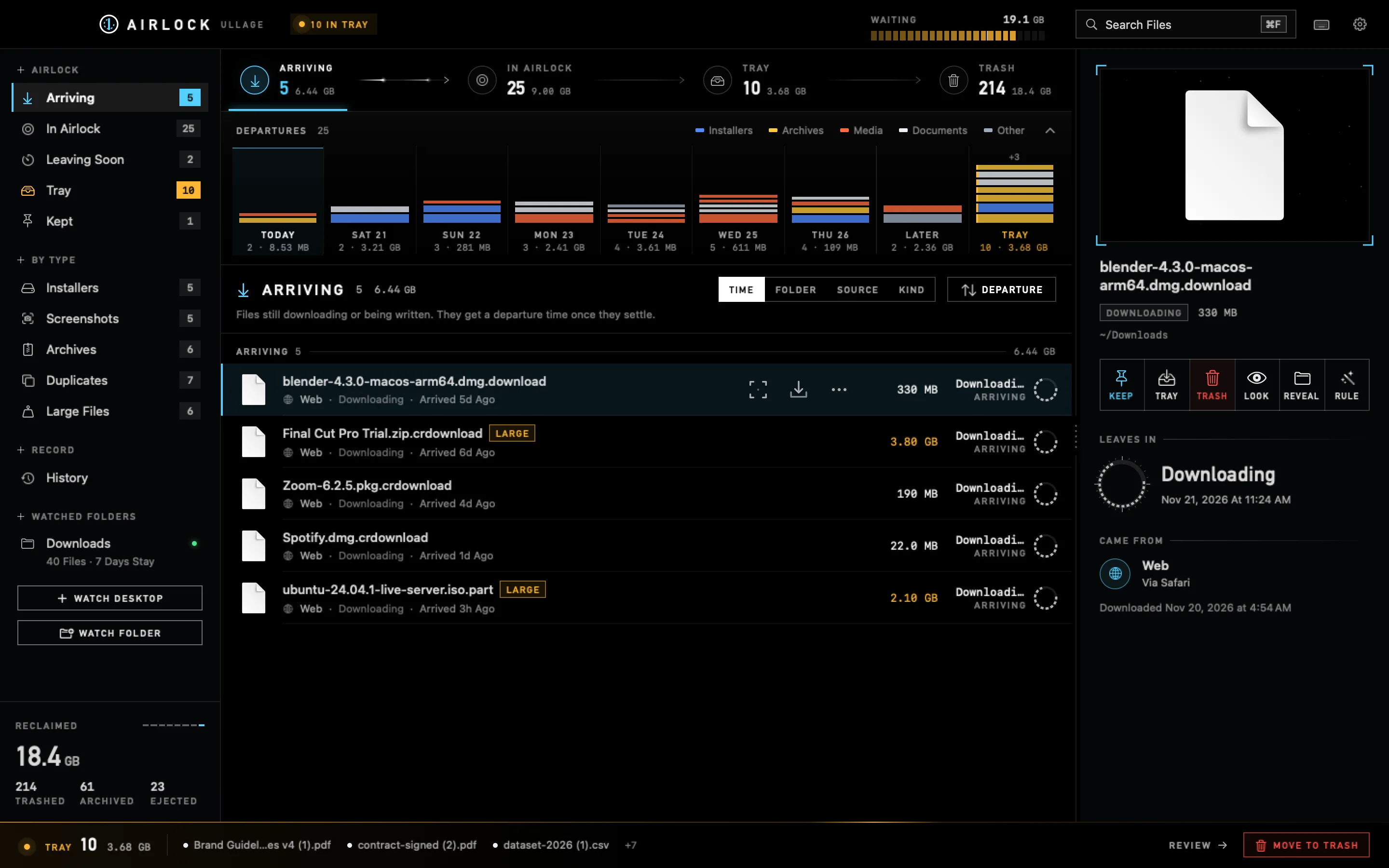
    Departure TimesEvery download gets a departure time. Set it per folder, snooze a file, or keep it for good.
  • 02
    Where It Came FromSee the website a file came from, an AirDrop transfer, or a file created on your Mac. Airlock keeps track.
  • 03
    Keep Or Extend FilesAdd time to a file’s departure, or pin it to keep it for good.
  • 04
    Custom RulesMake your own rules for any file type or folder, like moving all banking PDFs to an archive folder.
  • 05
    Skip The TrayOptionally have Airlock skip the Tray and send old files straight to the Trash.
Airlock's main window on Arriving: the Departures board above the files still downloading, which get a departure time once they settle
SEQ 03Installers

Installers, ejected.

Installers leave mounted drives in Finder and big files in Downloads. Airlock spots the finished install and ejects the mount automatically.
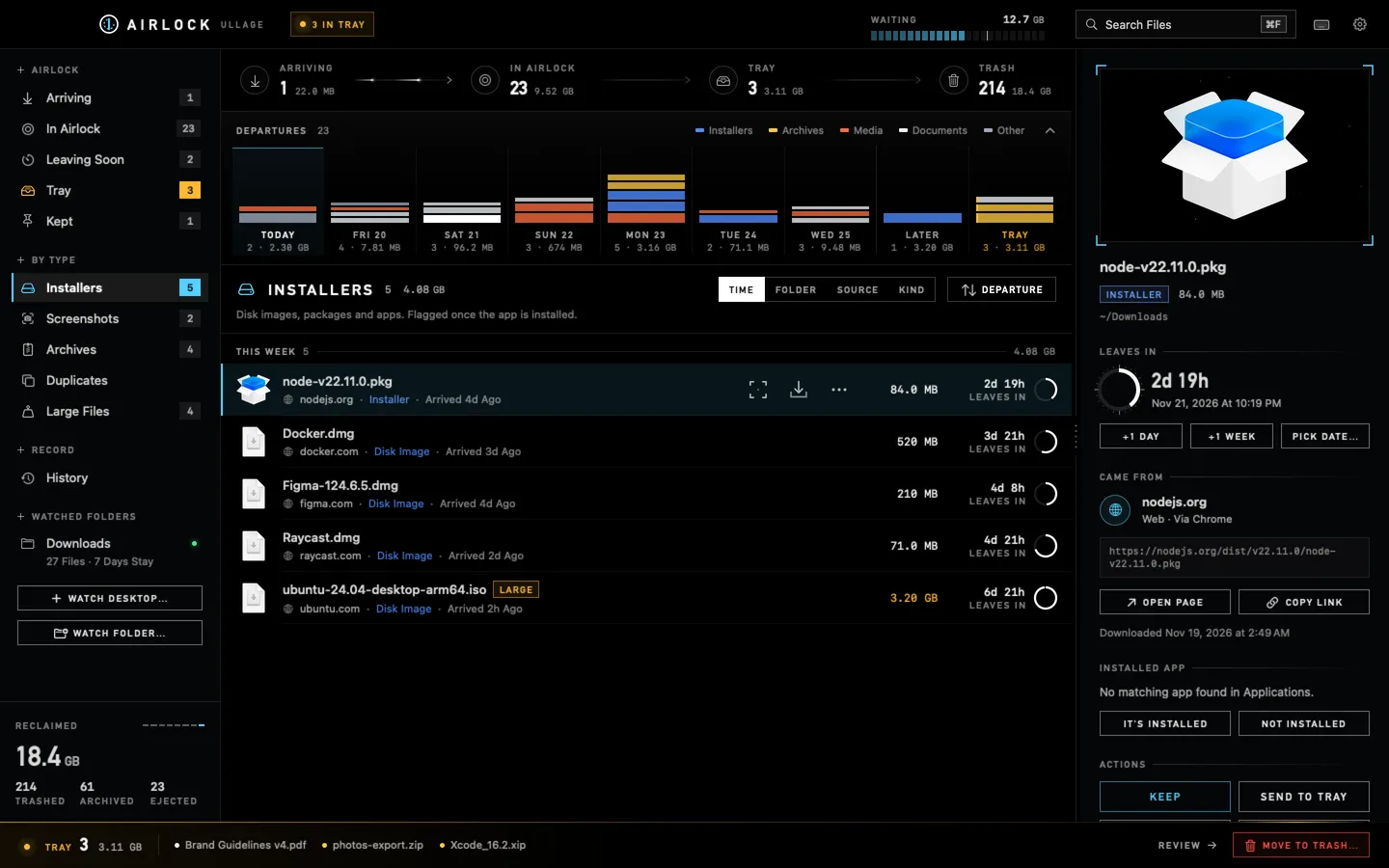
Airlock's Installers list: disk images and packages whose apps are installed, each with a departure time
Tray0Empty

A Finder sidebar lists three mounted installer drives under Locations: Figma, T3 Code and Docker. One by one Airlock ejects each drive and its installer moves to the Tray, until no installer drives are left.

  • 01
    Matches app to installerAirlock pairs each .dmg or .pkg with the app it installed, even if the file name doesn’t match the application.
  • 02
    Install done, disk goneAirlock detects a finished install and ejects the disk automatically, leaving your locations tidy.
  • 03
    The whole imageDisk images are detached completely, not just hidden from Finder, so emptying the Trash never finds them in use.
  • 04
    Tray first, Trash laterEjected installers wait in the Tray for your OK, and you can mark any app installed or not yourself.
SEQ 04Screenshots

Every screenshot, sorted.

Your Desktop stays clear. Screenshots are filed by what’s on screen, right away or after a delay.

  • 01
    Smart Screenshot GroupingAirlock groups screenshots by what it sees in them: the website in your browser or the app in the main window.
  • 02
    Private by DesignApple’s Vision framework reads each screenshot right on your Mac. No image or text is processed off your machine.
  • 03
    Neatly OrganizedScreenshots that don’t fit a group go into dated archives by day, week or month, your choice.
  • 04
    Full ControlChoose how soon Airlock picks up a new screenshot, so filing never interrupts your work.
SEQ 05Detectors

Clutter, spotted.

Duplicates, unpacked zips and stalled downloads pile up. Airlock spots them for you and tidies them into the Tray.

Duplicates

Same bytes, new name

“report (1).pdf” with exactly the contents of “report.pdf”. Compared byte for byte; the original always stays.

Already extracted

The zip you opened

An archive next to the folder it unpacked into. The folder stays; the zip can go.

Stalled downloads

Never finished

A .crdownload or .download that hasn’t moved in days. It gets a nudge instead of a departure.

Large files

Over a gigabyte

Anything above the size you set gets a badge and its own list, so the big ones never hide.

SEQ 06The Tray

Always undoable.

Expired files wait in the Tray until you say so. Trashing takes a hold of the button, and History puts anything back, even after a restart.

Outer door · Trash Move 10 Files To The Trash?

They go to the Trash, not away for good. Undo brings them back.

Manifest 103.68 GB
  • Brand Guidelines v4 (1).pdfDuplicate14.2 MB
  • contract-signed (2).pdfDuplicate420 KB
  • dataset-2026 (1).csvDuplicate12.0 MB
  • Docker.dmgStaged by you520 MB
  • logo-pack (1).zipDuplicate8.40 MB
  • Meeting Notes (1).docxDuplicate210 KB
  • Q3 Board Deck (1).pdfDuplicate6.40 MB
  • pixel-sprites (1).zipDuplicate20.4 MB
  • photos-export.zipAlready extracted48.0 MB
  • Xcode_16.2.xipApp installed3.05 GB
Cancel

Demo only. Nothing will be touched.

  • 01
    Nothing VanishesAirlock sends the Tray to your Finder Trash for your final approval.
  • 02
    Full HistoryA record of every file Airlock has moved, each with one-click Undo.
  • 03
    Set It and Forget ItTurn on automatic trashing after a day in the Tray, or skip the Tray entirely.
  • 04
    iCloud Drive SafeFiles in iCloud Drive always wait for your OK, since trashing one removes it everywhere.
SEQ 08Privacy

Zero telemetry.

No accounts, no analytics, no ads. Airlock can’t reach the internet, so your data never leaves your Mac.

Entitlements, in full
  • +app-sandbox
  • +files.downloads.read-write
  • +files.user-selected.read-write
  • +files.bookmarks.app-scope
  • −network.client
  • −network.server
  • −automation.apple-events
  • −temporary-exception.*

Hover a line.

Declared on the App Store
Data Not CollectedThe developer does not collect any data from this app.
  • 01
    Built PrivateNames, sizes, dates and where each file came from. Screenshots are read by Apple’s Vision framework, right on your Mac.
  • 02
    Nothing KeptScreenshots are read in about 50 ms, and nothing about what’s in them is stored or sent.
  • 03
    Stays on your MacRecords, rules and settings live in one file in the app’s own container. Reset Airlock clears it without touching a single file.
  • 04
    Always ReversibleThe Finder Trash is the only exit, and History keeps every move so anything can go back where it was.
  • 05
    Nothing Phones HomePure native Swift, no third-party frameworks or SDKs. No analytics, no crash reports, and no route to the internet.
SEQ 09Briefing

Questions, answered.

Still wondering? Write to Support.

Does Airlock delete my files?

No. Removal always means the Finder Trash, and only after you confirm. History puts anything back, even after you quit. If you want the review skipped, Settings has two opt-in choices: trash expired files after a day in the Tray, or straight away. Files in iCloud Drive always wait for you, because trashing one removes it from every device.

Why does it ask for my Desktop?

Mac App Store apps run in the App Sandbox. Airlock can read Downloads without asking; any other folder, the Desktop included, you pick once in the standard Open panel and Airlock remembers it. Downloads alone works fine.

What happens to files already in my folders?

You choose when you set it up: give them a grace period (they leave that many days from today), or count from when they arrived. Airlock shows how many would go straight to the Tray before you choose.

How does it know where a file came from?

macOS stores it with every download: the page, the link, and the app that saved it. Airlock reads that on your Mac, keeps it with the file’s record, and still knows it after you rename the file.

Does it look at my screenshots?

Only if you turn on Group By What’s On Screen. Then Apple’s Vision framework reads each screenshot on your Mac, in about 50 milliseconds, to name a folder for the app or website it shows. Nothing leaves the Mac, and no image or text is kept.

Does it phone home?

Airlock is built without the network entitlement, so it has nowhere to send anything. No accounts, no analytics, no ads, no crash reporter. On the App Store it is declared as “Data Not Collected”.

What does it run on?

macOS 14 Sonoma or later, on Apple silicon and Intel Macs. It lives in the menu bar and the Dock, or only the menu bar if you prefer.

Why “Airlock”?

An airlock is the chamber between two doors. Things come in through the inner door, wait, and only leave when the outer door opens. That is what happens to every download.

Final countdown/SEQ 10

T3

Keep the space. Lose the clutter.

Airlock runs on Apple silicon and Intel Macs, on macOS 14 or later. Free on the Mac App Store.

macOS 14+ · Apple silicon & Intel · English

? mission hotkeys